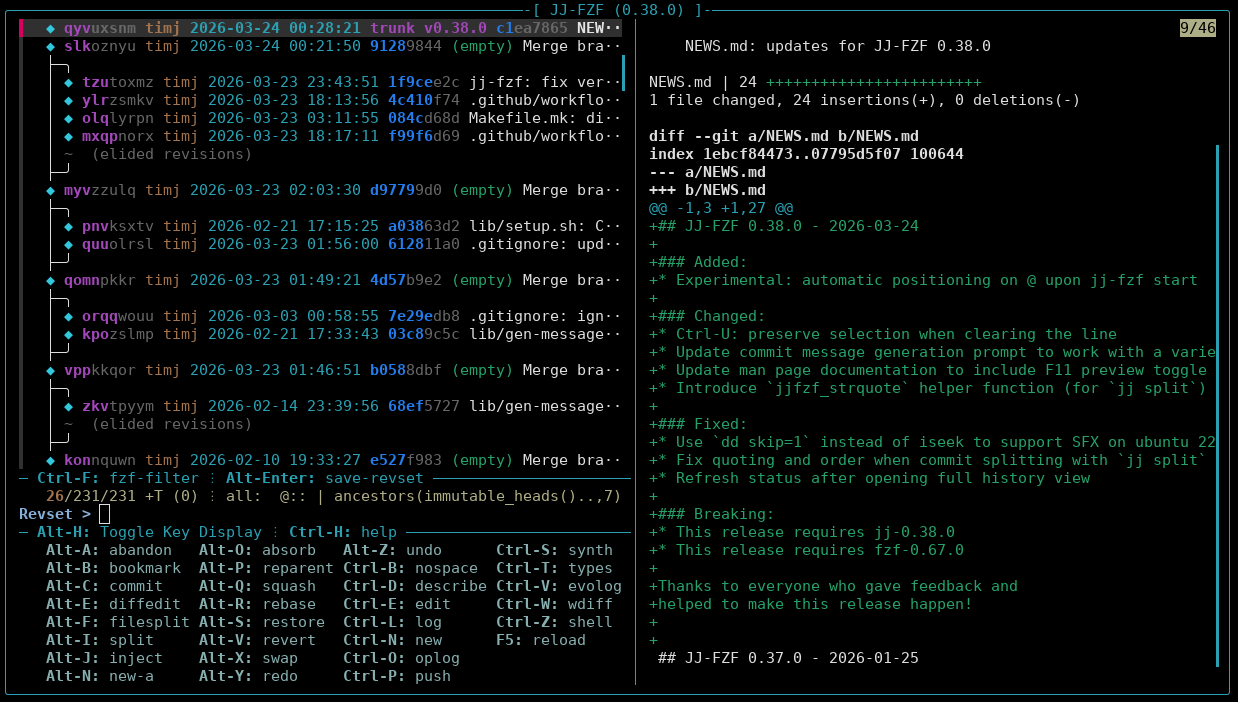
What Is jj-fzf?
The Jujutsu VCS has flexible
expressions for specifying revision sets and allows non-linear editing
of (ancestry) commits. jj-fzf is an interactive TUI
that turns the jj log output into a fast keyboard driven
control panel. Based on fzf, it allows live revset editing,
instant diff previews of the selected commit, and quick shortcuts for
the most common operations like rebase, split, squash, undo/redo,
merging and more. All commands are executed while printing the exact
jj <cmd> it runs to stderr so you keep learning the
jj CLI at the same time.
Everything you need to get started is in the README.md with asciinema demos and all the details can be found with jj-fzf –man.
What’s new in 0.38.0
Highlights:
- Experimental auto-positioning on
@at startup: Whenjj-fzfis started, it now automatically positions thefzfcursor on your current working-copy commit. - Ctrl-U now preserves selection: When
Ctrl-Uclears the input field, selected revisions are preserved. This allows use of the fuzzy search to find a revision to be selected and clearing the finder to return to the full view.
Improvements:
- Better Ctrl-S commit-message generation: The LLM prompt used for commit message generation was refined to hopefully cater better to the wide variety of models, and especially small ones that may be run locally. The LLM configuration is described in the LLM Configuration section.
- Alt-I commit splitting fixes: Special characters
could trip up the way
jj-fzfused to calljj split, so this release adds stable sorting of files to split and proper quoting of file names using the newjjfilesets syntax. - F11 full screen toggle: While the functionality had been implemented early on, it is now properly documented.
- SFX support for Ubuntu 22.04: The way the
self-extracting binary build extracts its embedded tarball was adjusted
to support older version of
dd.
How to upgrade
Installation: Pick one:
- Just download the self-extracting binary jj-fzf.sfx,
mark it executable with
chmod +x jj-fzf.sfx(possibly rename it) and run it. - Download the new release tarball jj-fzf-0.38.0.tar.zst
and build and install it:
make all && make install PREFIX=~/.local
Important notes:
This release requires jj 0.38.0
and fzf
0.67.0.
A huge thank-you to everyone who tested, reported issues, and gave feedback!
Try it out in your repo with a simple jj-fzf, and give
feedback how the new auto-positioning feels. What improvement would you
love to see next? Open an issue on GitHub if you run into bugs or have
feature requests.
Happy jj-ing! 🚀